UX/Web Design - Cisco.com
UX/Web Design - Cisco.com
Cisco Partner Logo Builder
Cisco Partner Logo Builder
Cisco.com Support Team
Cisco Support Team
Cisco support team
Sole Design Lead
Sole Design Lead
2025
UX/Web Design
Cisco partners rely on official logos and certificates to represent their credentials in sales, co-branding, and certification materials. The existing Logo Builder dumped every option on one screen — with no guidance and no clear sequence. Partners are paid clients operating at scale, and the tool wasn't treating them that way.
Cisco partners rely on official logos and certificates to represent their credentials in sales, co-branding, and certification materials. The existing Logo Builder dumped every option on one screen — with no guidance and no clear sequence. Partners are paid clients operating at scale, and the tool wasn't treating them that way.
Cisco partners rely on official logos and certificates to represent their credentials in sales, co-branding, and certification materials. The existing Logo Builder dumped every option on one screen — with no guidance and no clear sequence. Partners are paid clients operating at scale, and the tool wasn't treating them that way.
goals
goals
GOALS
· Intent-first flow - Guide users through asset creation based on what they need, not a configuration list.
· Modern UI - Bring the interface in line with current Cisco brand standards.
· Reduce decision fatigue - Progressive disclosure and smart defaults so users aren't overwhelmed up front.
· Simplified download - One clean ZIP package — no manual multi-format exporting.
· Intent-first flow - Guide users through asset creation based on what they need, not a configuration list.
· Modern UI - Bring the interface in line with current Cisco brand standards.
· Reduce decision fatigue - Progressive disclosure and smart defaults so users aren't overwhelmed up front.
· Simplified download - One clean ZIP package — no manual multi-format exporting.
· Intent-first flow - Guide users through asset creation based on what they need, not a configuration list.
· Modern UI - Bring the interface in line with current Cisco brand standards.
· Reduce decision fatigue - Progressive disclosure and smart defaults so users aren't overwhelmed up front.
· Simplified download - One clean ZIP package — no manual multi-format exporting.
Discovery - Pain Points
Discovery - Pain Points
Discovery - Pain Points
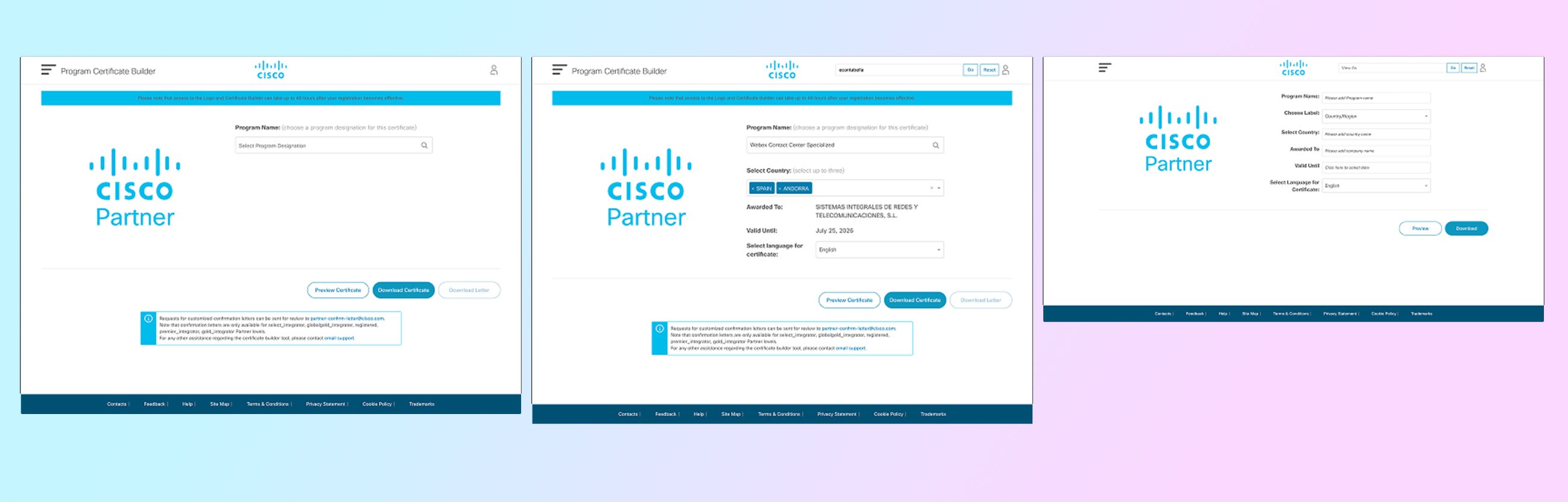
We mapped the existing user journey and identified three core friction zones — all confirmed by stakeholder feedback from the Cisco.com Support team.
We mapped the existing user journey and identified three core friction zones — all confirmed by stakeholder feedback from the Cisco.com Support team.
We mapped the existing user journey and identified three core friction zones — all confirmed by stakeholder feedback from the Cisco.com Support team.
Pain 01
Pain 01
Color selection before context — users picking a color scheme before knowing what asset they need.
Color selection before context — users picking a color scheme before knowing what asset they need.
Color selection before context — users picking a color scheme before knowing what asset they need.
Pain 02
Pain 02
Credential list overload — long undifferentiated lists with no filtering, grouping, or priority order.
Credential list overload — long undifferentiated lists with no filtering, grouping, or priority order.
Credential list overload — long undifferentiated lists with no filtering, grouping, or priority order.
Pain 03
Pain 03
Manual multi-format export — users downloading each file format separately with no summary.
Manual multi-format export — users downloading each file format separately with no summary.
Manual multi-format export — users downloading each file format separately with no summary.
Stakeholder check-ins with product, brand, and partner program teams ran bi-weekly throughout the project.
Stakeholder check-ins with product, brand, and partner program teams ran bi-weekly throughout the project.
Stakeholder check-ins with product, brand, and partner program teams ran bi-weekly throughout the project.
PLANNING
PLANNING
PLANNING
Before
Land on Tool
Pick color
Scroll all options
Export manually
Before
Land on Tool
Pick color
Scroll all options
Export manually
Before
Land on Tool
Pick color
Scroll all options
Export manually
After
Choose intent
Configure
Preview
Download Zip
After
Choose intent
Configure
Preview
Download Zip
After
Choose intent
Configure
Preview
Download Zip
Design - Three Intent Paths
Design - Three Intent Paths
Design - Three Intent Paths
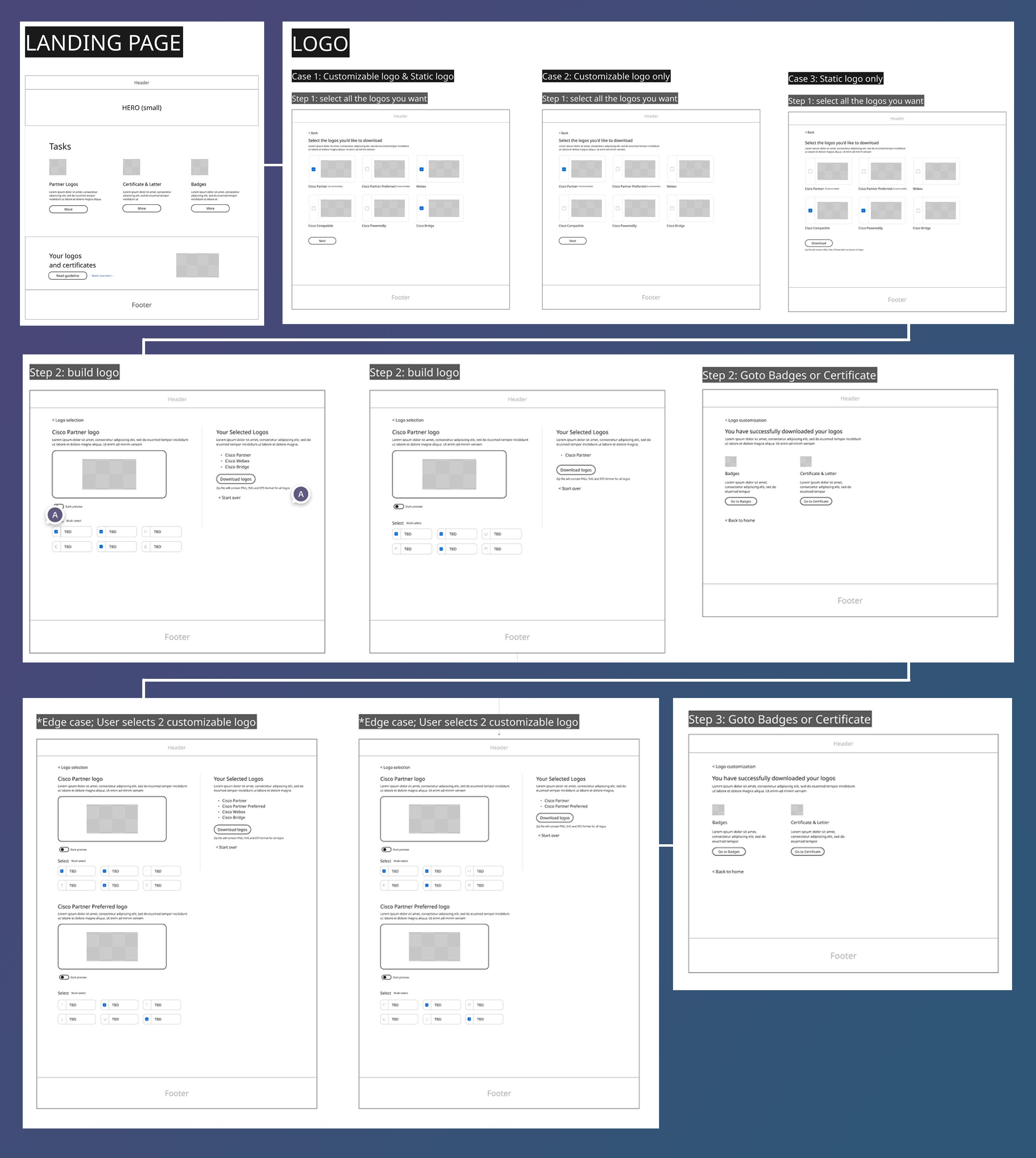
We restructured the tool into three distinct entry paths based on what partners actually come to build. Each path starts from intent, not configuration.
Terminology update: "credentials" → "Portfolios" — matches how partners actually categorize their assets in the real world.
We restructured the tool into three distinct entry paths based on what partners actually come to build. Each path starts from intent, not configuration.
Terminology update: "credentials" → "Portfolios" — matches how partners actually categorize their assets in the real world.
We restructured the tool into three distinct entry paths based on what partners actually come to build. Each path starts from intent, not configuration.
Terminology update: "credentials" → "Portfolios" — matches how partners actually categorize their assets in the real world.
Logo flow
Logo flow
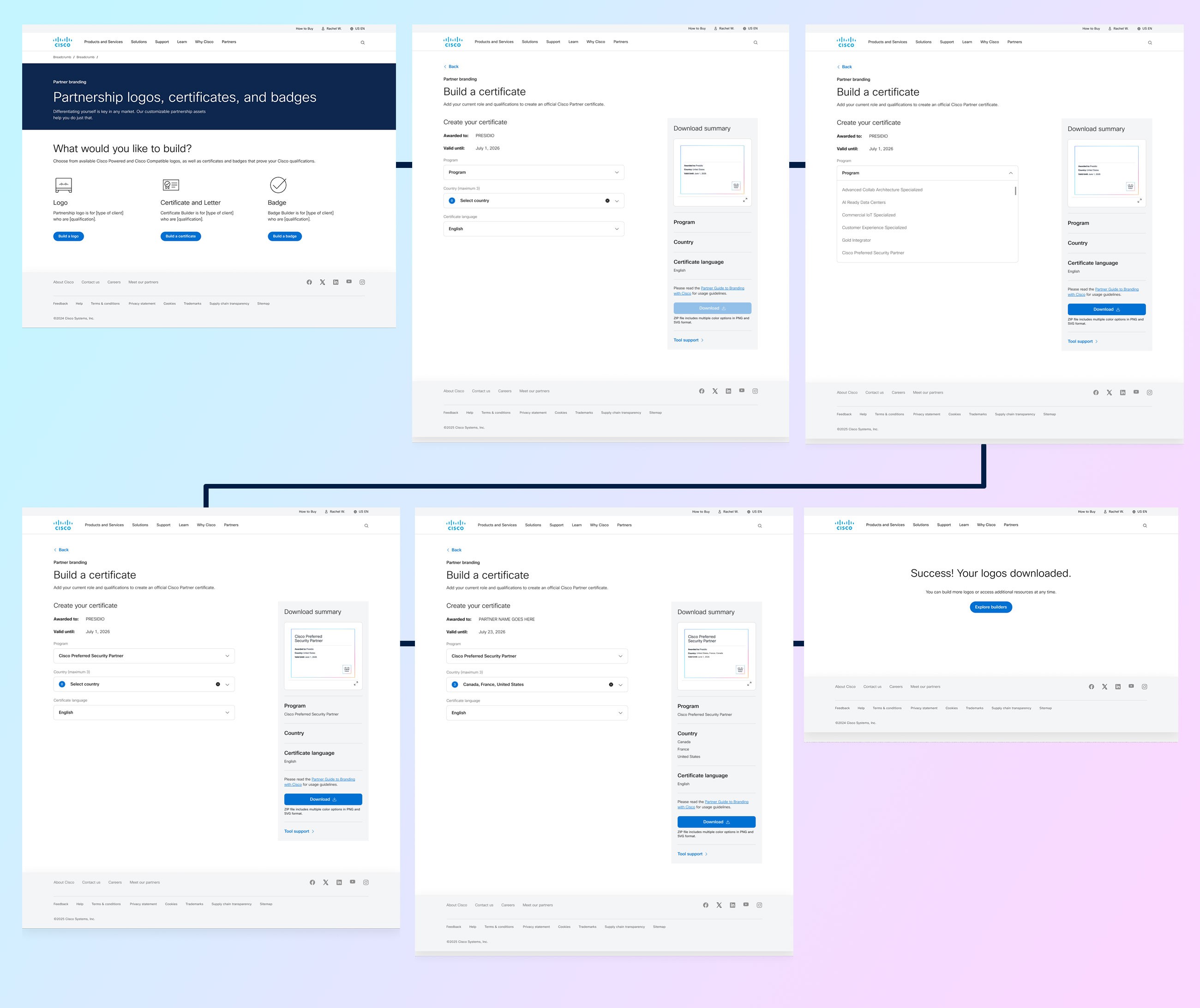
Certificate flow
Certificate flow
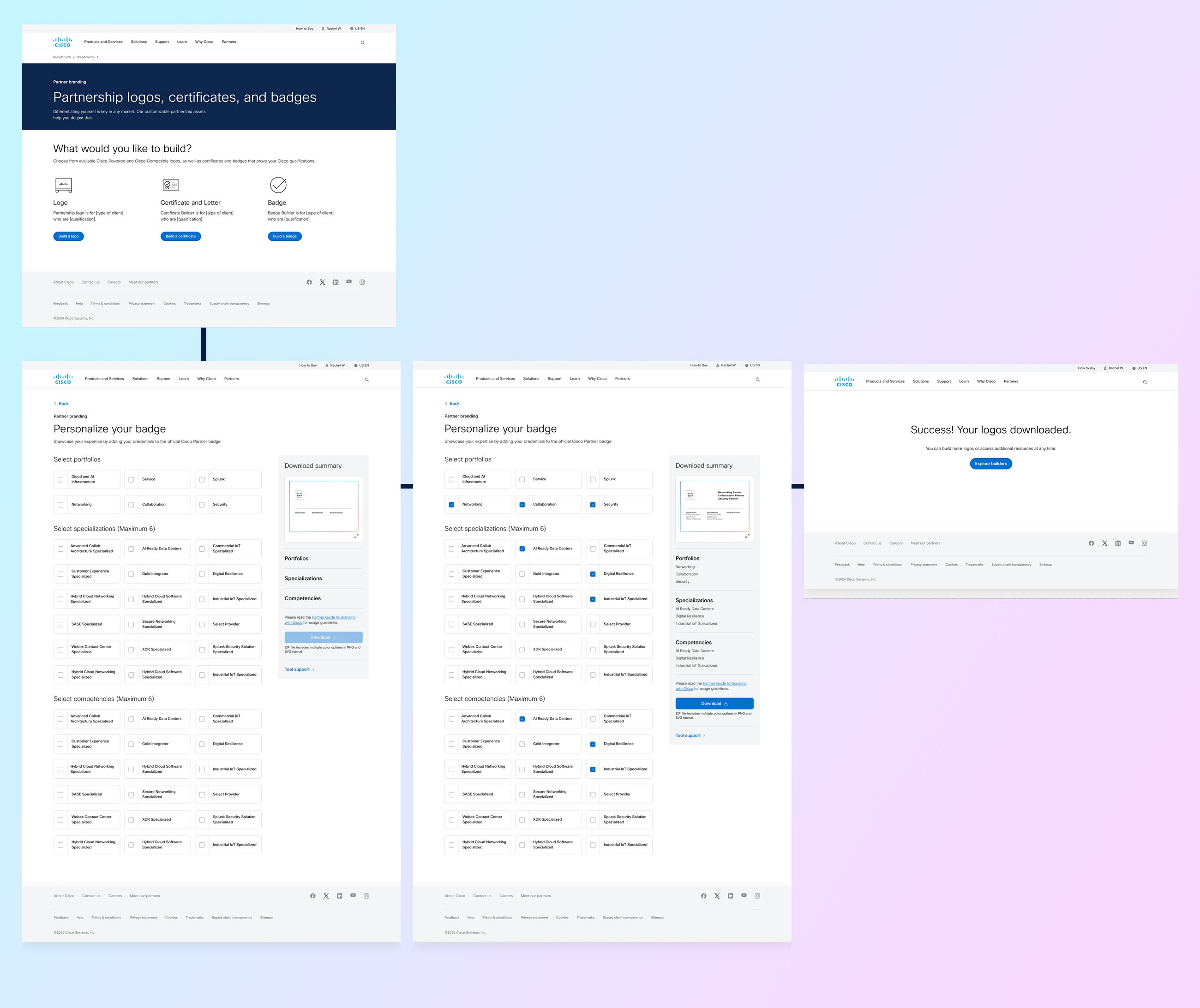
Badge flow
Badge flow
DESIGN - Download Summary Panel
DESIGN - Download Summary Panel
DESIGN - Download Summary Panel
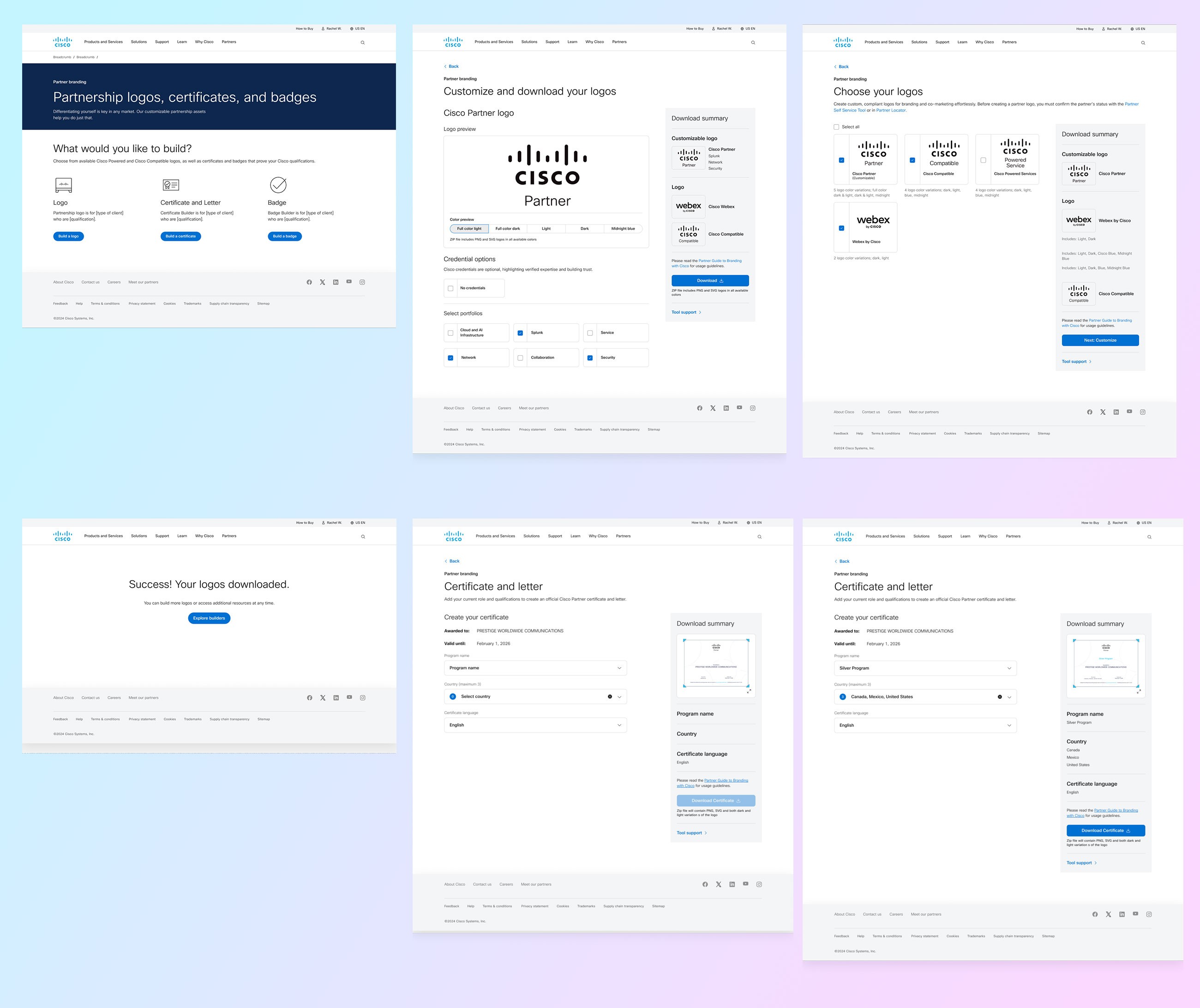
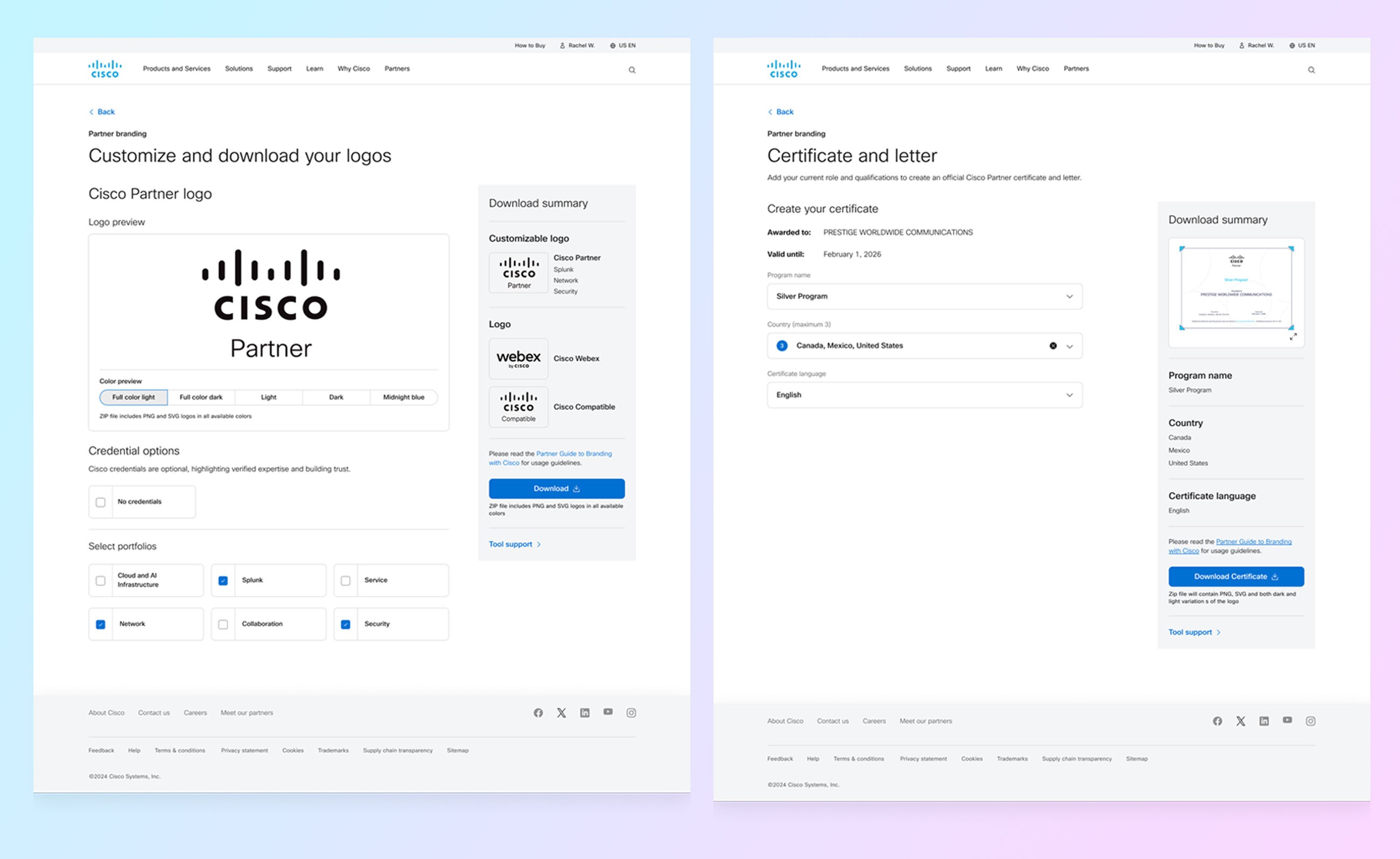
A persistent panel on the right tracks selections in real time — giving users confidence throughout the configuration process. No more uncertainty about what's in their download until after the fact.
Final download delivers a single ZIP file containing all formats — eliminating the manual per-format export that caused the most friction in the old tool.
A persistent panel on the right tracks selections in real time — giving users confidence throughout the configuration process. No more uncertainty about what's in their download until after the fact.
Final download delivers a single ZIP file containing all formats — eliminating the manual per-format export that caused the most friction in the old tool.
A persistent panel on the right tracks selections in real time — giving users confidence throughout the configuration process. No more uncertainty about what's in their download until after the fact.
Final download delivers a single ZIP file containing all formats — eliminating the manual per-format export that caused the most friction in the old tool.
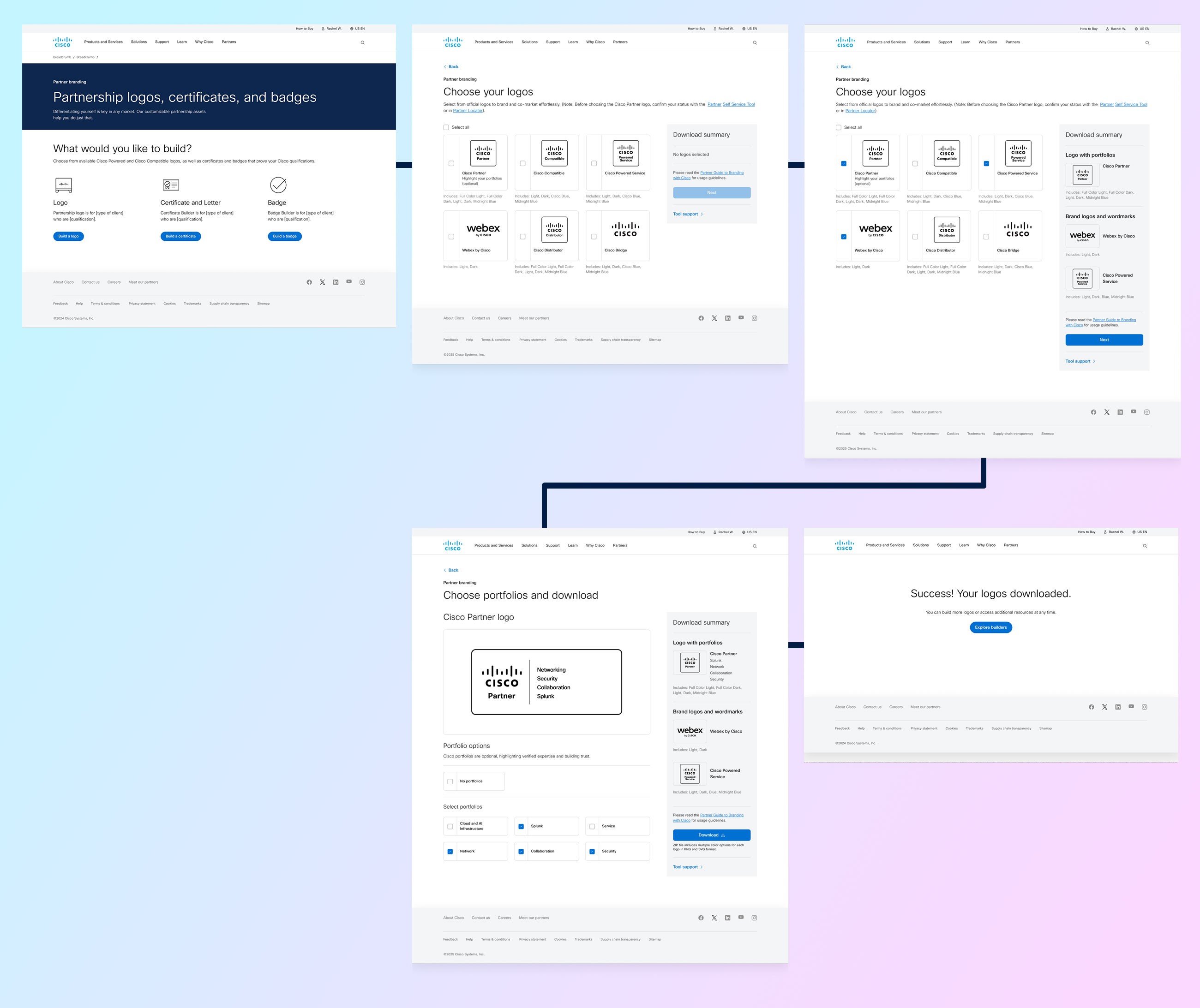
01 - Select asset type (Logo / Certificate / Badge)
02 - Choose credential / Portfolio from filtered list
03 - Configure color, size, and orientation
04 - Preview live in Download Summary panel
05 - Download ZIP — all formats included
01 - Select asset type (Logo / Certificate / Badge)
02 - Choose credential / Portfolio from filtered list
03 - Configure color, size, and orientation
04 - Preview live in Download Summary panel
05 - Download ZIP — all formats included
01 - Select asset type (Logo / Certificate / Badge)
02 - Choose credential / Portfolio from filtered list
03 - Configure color, size, and orientation
04 - Preview live in Download Summary panel
05 - Download ZIP — all formats included
OUTCOME
OUTCOME
Stakeholder feedback was highly positive — internal clients responded well to the clarity of the guided flow and the simplified download experience.
Stakeholder feedback was highly positive — internal clients responded well to the clarity of the guided flow and the simplified download experience.
· Intent-first guided experience with dramatically reduced cognitive load
· Single ZIP download replaces manual multi-format export
· Persistent Download Summary panel gives users real-time confidence throughout
· Highly positive stakeholder feedback from Cisco partner program team
· Scalable logic built to support future partner program and credential expansions
· Intent-first guided experience with dramatically reduced cognitive load
· Single ZIP download replaces manual multi-format export
· Persistent Download Summary panel gives users real-time confidence throughout
· Highly positive stakeholder feedback from Cisco partner program team
· Scalable logic built to support future partner program and credential expansions
Next Project
Back to start
Momentum Design System Rebrand
End-to-end rebrand of Webex's enterprise design system
OUTCOME
Stakeholder feedback was highly positive — internal clients responded well to the clarity of the guided flow and the simplified download experience.
· Intent-first guided experience with dramatically reduced cognitive load
· Single ZIP download replaces manual multi-format export
· Persistent Download Summary panel gives users real-time confidence throughout
· Highly positive stakeholder feedback from Cisco partner program team
· Scalable logic built to support future partner program and credential expansions