Product UX - Cisco Webex
Product UX - Cisco Webex
First Time Set-up Wizard
First Time Set-up Wizard
Admin Design Team
Cisco Support Team
Cisco support team
Visual Design, UX, Strategy
Visual Design, UX, Strategy
2020-2021
Product UX
The onboarding flow inherited from Cisco's BroadSoft acquisition was broken — duplicate inputs, visual errors, unclear navigation, and a trial-to-paid conversion path that redirected partners to Control Hub mid-setup without clear instructions. 100+ partner companies depended on this flow every day. It needed a full redesign.
The onboarding flow inherited from Cisco's BroadSoft acquisition was broken — duplicate inputs, visual errors, unclear navigation, and a trial-to-paid conversion path that redirected partners to Control Hub mid-setup without clear instructions. 100+ partner companies depended on this flow every day. It needed a full redesign.
The onboarding flow inherited from Cisco's BroadSoft acquisition was broken — duplicate inputs, visual errors, unclear navigation, and a trial-to-paid conversion path that redirected partners to Control Hub mid-setup without clear instructions. 100+ partner companies depended on this flow every day. It needed a full redesign.
goals
GOALS
goals
· Trial creation - Redesign from the ground up — simple, fluid, and fast for partners creating multiple clients per day.
· Visual consistency - Apply the Admin Design System throughout for a coherent experience with Control Hub.
· Paid conversion - Complete the entire setup in one session — no mid-flow redirects to Control Hub.
· Conditional flows - Build distinct paths based on account type — only show steps relevant to each partner's setup.
· Intent-first flow - Guide users through asset creation based on what they need, not a configuration list.
· Modern UI - Bring the interface in line with current Cisco brand standards.
· Reduce decision fatigue - Progressive disclosure and smart defaults so users aren't overwhelmed up front.
· Simplified download - One clean ZIP package — no manual multi-format exporting.
· Intent-first flow - Guide users through asset creation based on what they need, not a configuration list.
· Modern UI - Bring the interface in line with current Cisco brand standards.
· Reduce decision fatigue - Progressive disclosure and smart defaults so users aren't overwhelmed up front.
· Simplified download - One clean ZIP package — no manual multi-format exporting.
Discovery - Audit & Research
Discovery - Audit & Research
Discovery - Audit & Research
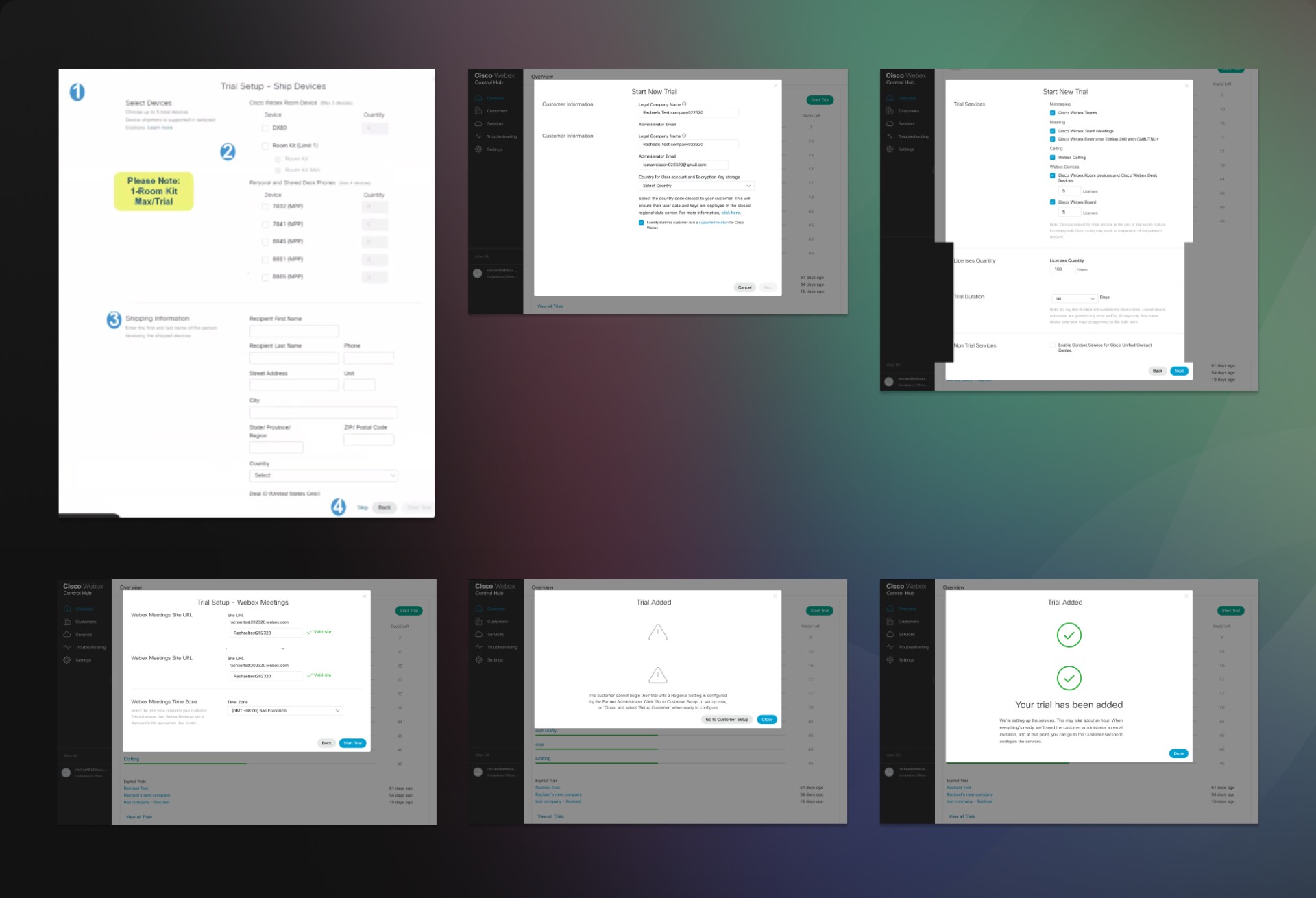
We audited every screen of the existing flow, documenting pain points and questions for the Product team. Key issues identified: duplicate company name inputs, an encryption code field placed under the address section, misplaced elements, redundant icons, and inconsistent component sizes throughout.
Competitive benchmarking covered RingCentral— noting how each structured their sign-up process and where we needed to differentiate.
We audited every screen of the existing flow, documenting pain points and questions for the Product team. Key issues identified: duplicate company name inputs, an encryption code field placed under the address section, misplaced elements, redundant icons, and inconsistent component sizes throughout.
Competitive benchmarking covered RingCentral— noting how each structured their sign-up process and where we needed to differentiate.
We audited every screen of the existing flow, documenting pain points and questions for the Product team. Key issues identified: duplicate company name inputs, an encryption code field placed under the address section, misplaced elements, redundant icons, and inconsistent component sizes throughout.
Competitive benchmarking covered RingCentral— noting how each structured their sign-up process and where we needed to differentiate.
User Research
User Research
User Research
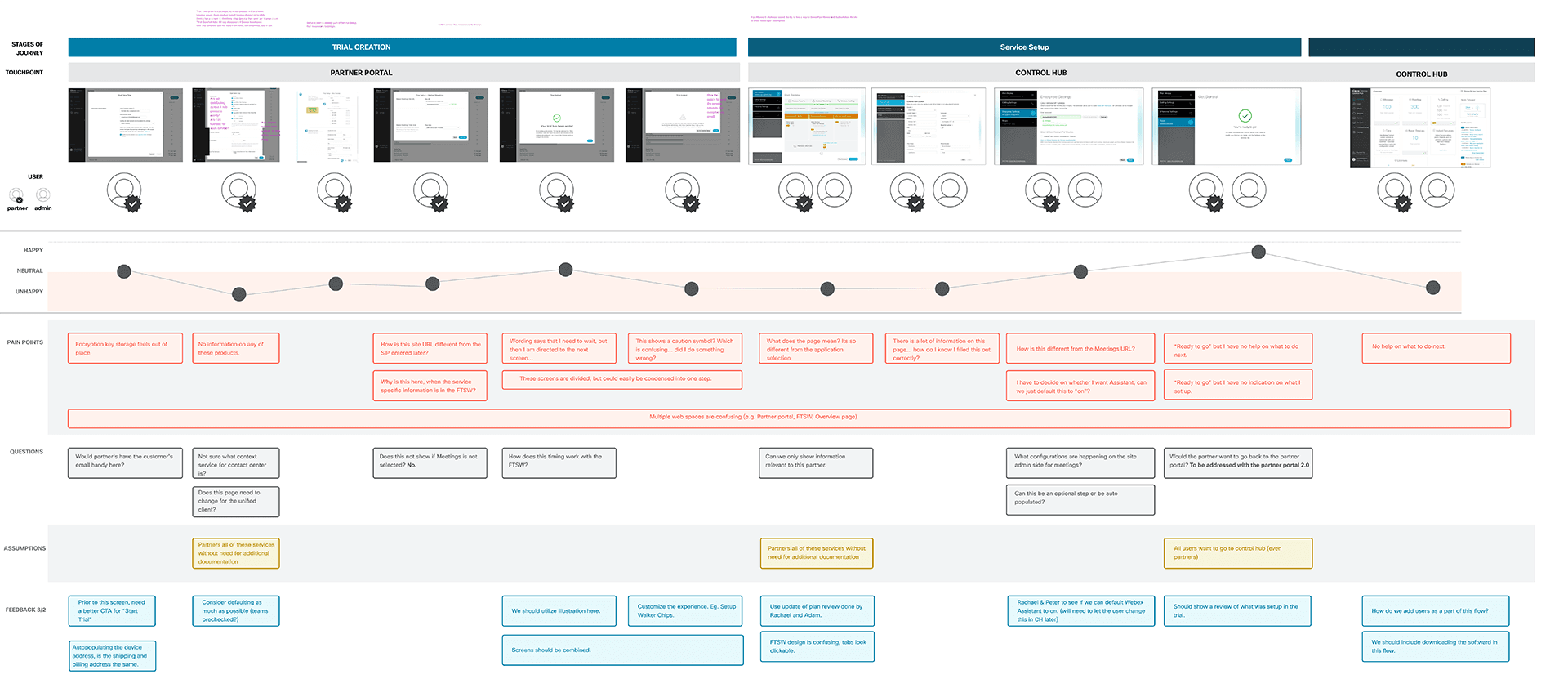
We conducted four user interviews. All participants confirmed the same finding: experienced partners could navigate by domain knowledge, but first-time or inexperienced agents consistently struggled with unclear instructions.
Before
Land on Tool
Pick color
Scroll all options
Export manually
We conducted four user interviews. All participants confirmed the same finding: experienced partners could navigate by domain knowledge, but first-time or inexperienced agents consistently struggled with unclear instructions.
"Instructions were challenging for first-time users to understand — all four interviewees agreed that inexperienced agents would struggle to grasp parts of the process."
"Instructions were challenging for first-time users to understand — all four interviewees agreed that inexperienced agents would struggle to grasp parts of the process."
"Instructions were challenging for first-time users to understand — all four interviewees agreed that inexperienced agents would struggle to grasp parts of the process."
PAIN 01
Duplicate inputs — company name asked twice, encryption code buried under address.
Before
Land on Tool
Pick color
Scroll all options
Export manually
PAIN 01
Duplicate inputs — company name asked twice, encryption code buried under address.
PAIN 02
No product information — partners didn't know what they were setting up at each step.
Before
Land on Tool
Pick color
Scroll all options
Export manually
PAIN 02
No product information — partners didn't know what they were setting up at each step.
PAIN 03
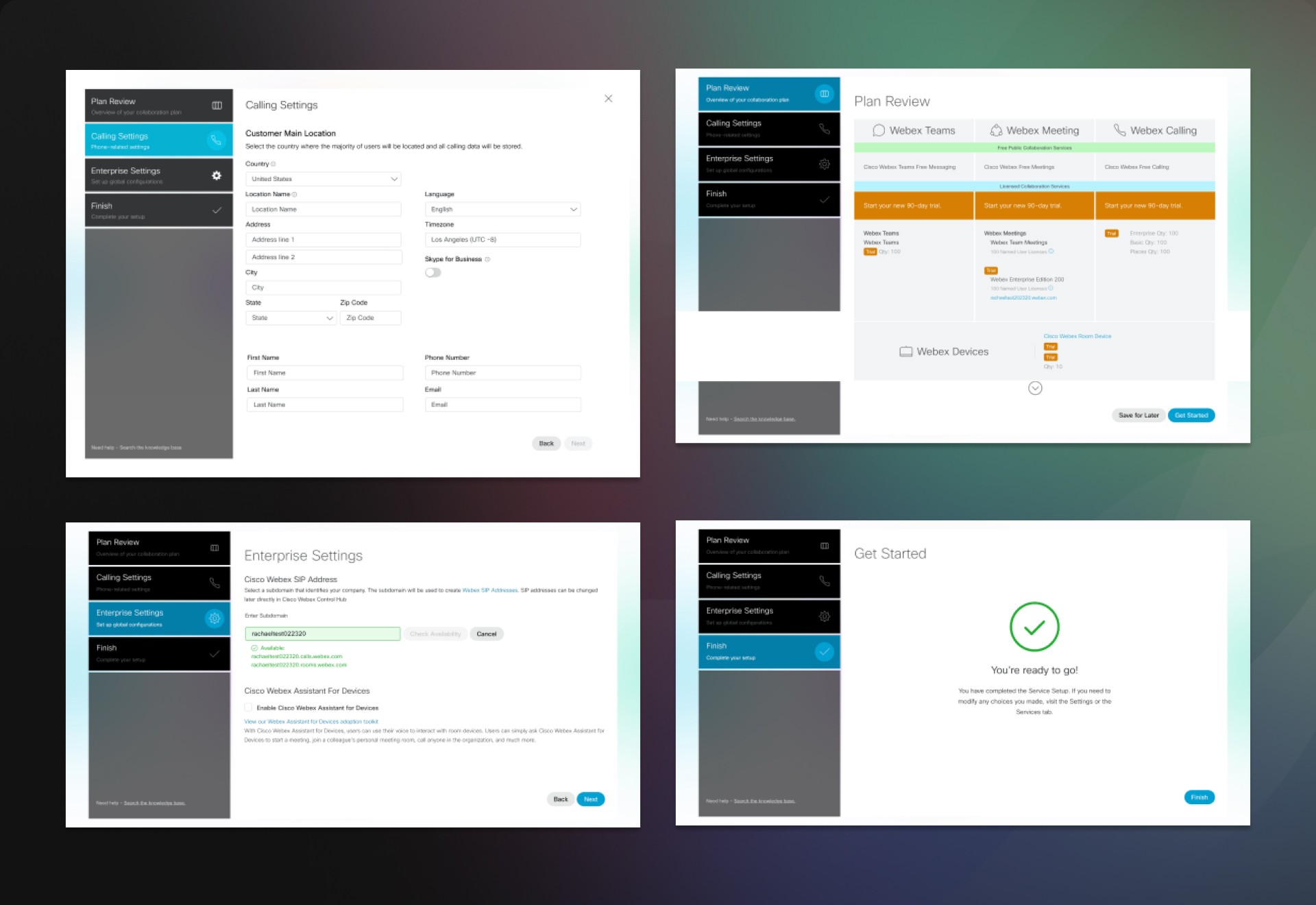
Mid-flow redirect — paid conversion sent users back to Control Hub without clear instructions.
Before
Land on Tool
Pick color
Scroll all options
Export manually
PAIN 03
Mid-flow redirect — paid conversion sent users back to Control Hub without clear instructions.
Old Paid flow
Before
Land on Tool
Pick color
Scroll all options
Export manually
Old Paid flow
Old set-up flow
Before
Land on Tool
Pick color
Scroll all options
Export manually
Old set-up flow
Stakeholders & communication
Stakeholders & communication
Stakeholders & communication
Weekly Stand-ups
PM relayed feedback from Product Lead and EVP weekly throughout the project.
Before
Land on Tool
Pick color
Scroll all options
Export manually
Weekly Stand-ups
PM relayed feedback from Product Lead and EVP weekly throughout the project.
Scenario Reviews
Weekly sessions during design phase to map every possible user route with the PM.
Before
Land on Tool
Pick color
Scroll all options
Export manually
Scenario Reviews
Weekly sessions during design phase to map every possible user route with the PM.
Engineering
Worked directly with Engineering to capture all account state variations for conditional logic.
Before
Land on Tool
Pick color
Scroll all options
Export manually
Engineering
Worked directly with Engineering to capture all account state variations for conditional logic.
EVP & CPO
Executive stakeholder involvement — additional feedback routed through product directors.
Before
Land on Tool
Pick color
Scroll all options
Export manually
EVP & CPO
Executive stakeholder involvement — additional feedback routed through product directors.
DESIGN - TRIAL CREATION REDESIGN
DESIGN - TRIAL CREATION REDESIGN
DESIGN - TRIAL CREATION REDESIGN
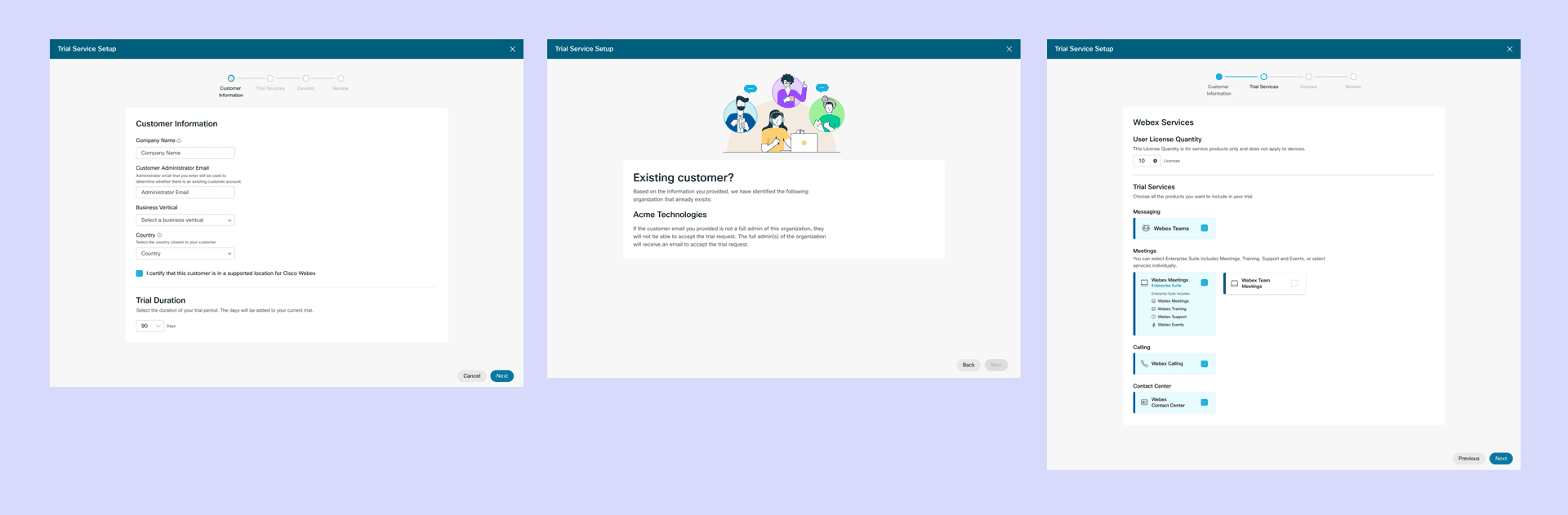
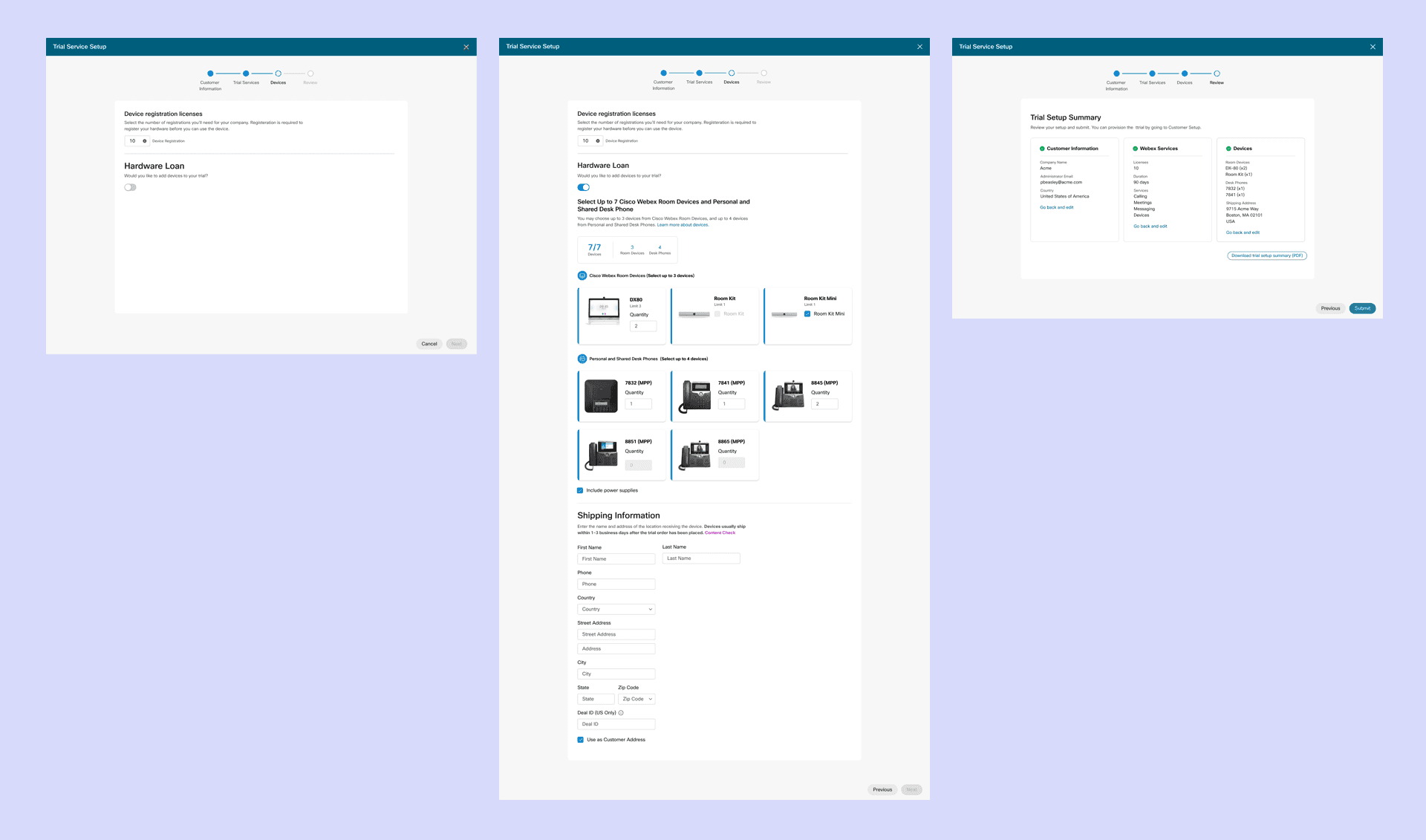
The new trial flow is divided into four clear, sequential steps. Each step has relevant inputs only — no bleeding across sections, no duplicate fields.
The new trial flow is divided into four clear, sequential steps. Each step has relevant inputs only — no bleeding across sections, no duplicate fields.
The new trial flow is divided into four clear, sequential steps. Each step has relevant inputs only — no bleeding across sections, no duplicate fields.
Calling
Cisco Support Team
Cisco support team
Number
Cisco Support Team
Cisco support team
Meetings
Cisco Support Team
Cisco support team
Review
Cisco Support Team
Cisco support team
Content - collaborated with a content writer on plain-language instructions at every step.
Content - collaborated with a content writer on plain-language instructions at every step.
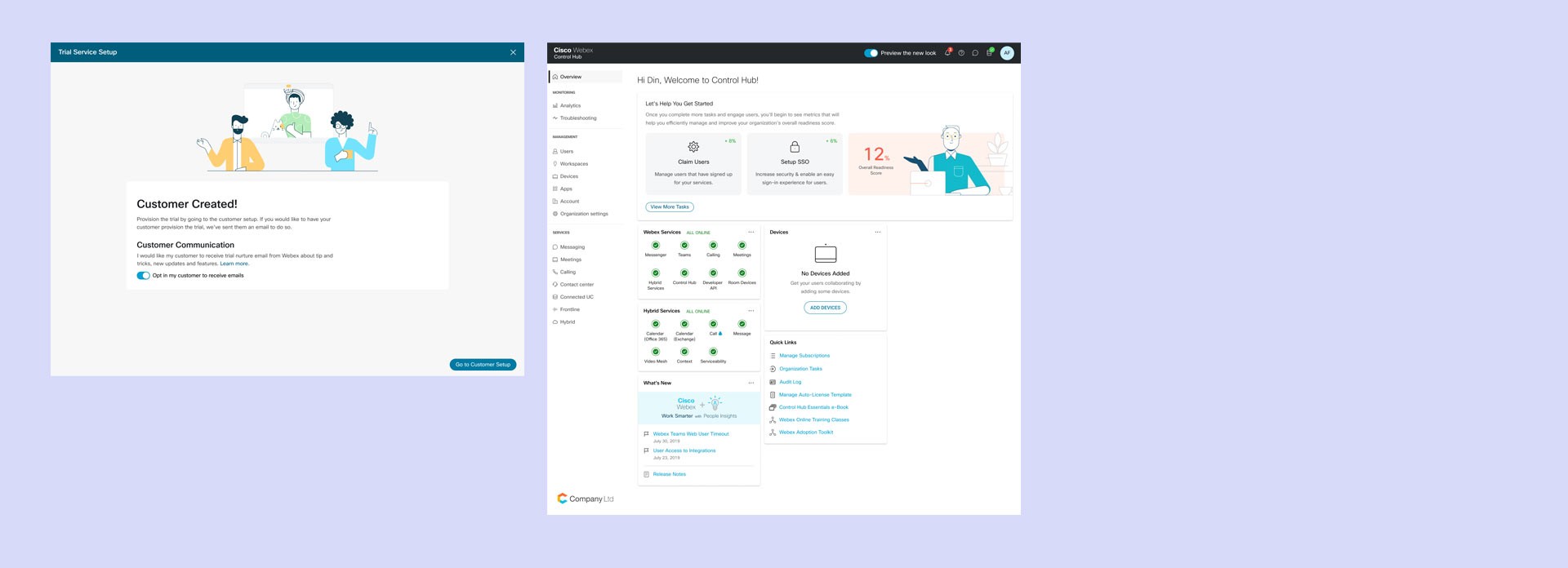
Illustrations - encouraging and congratulatory visuals at key moments tested positively in user interviews.
Illustrations - encouraging and congratulatory visuals at key moments tested positively in user interviews.
Admin Design System - applied throughout for full visual consistency with Control Hub.
Admin Design System - applied throughout for full visual consistency with Control Hub.
Before
Duplicate company name input Encryption code buried under address No product information at any step Inconsistent component sizes Visual errors and redundant icons
After
4 clean sequential steps: Calling → Number → Meetings → Review
Clear per-step instructions written with content writer
Illustrations at key moments
Full Admin Design System applied
DESIGN - Paid Conversion Redesign
DESIGN - Paid Conversion Redesign
DESIGN - Paid Conversion Redesign
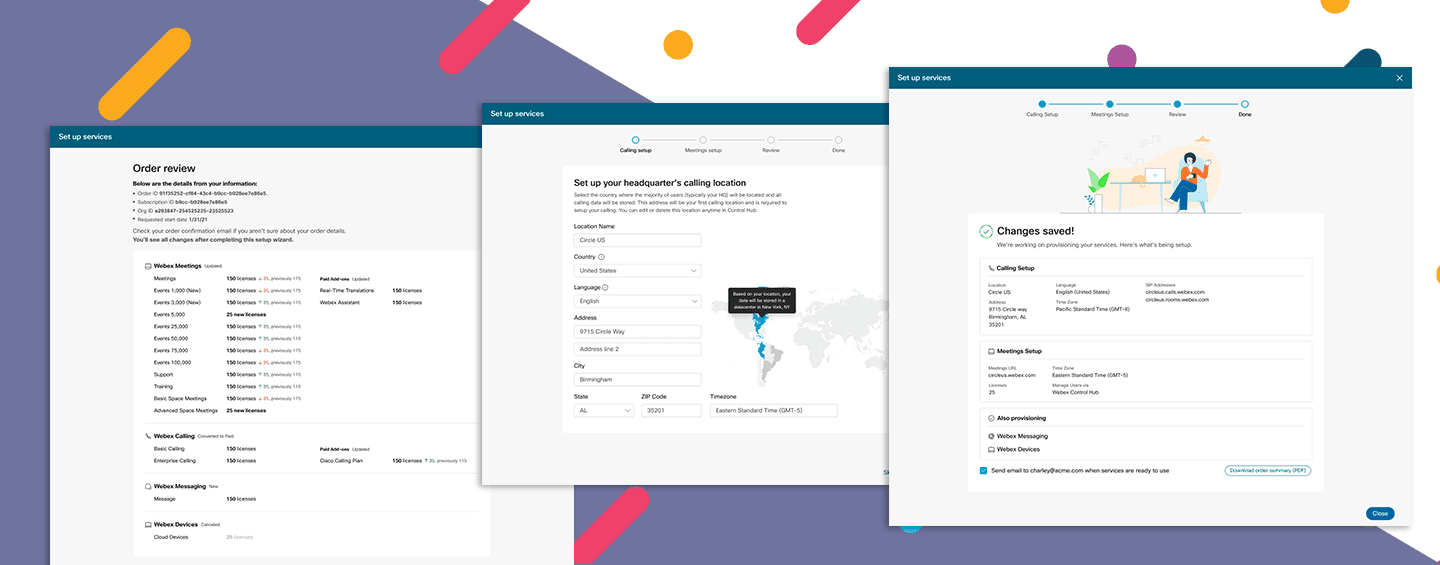
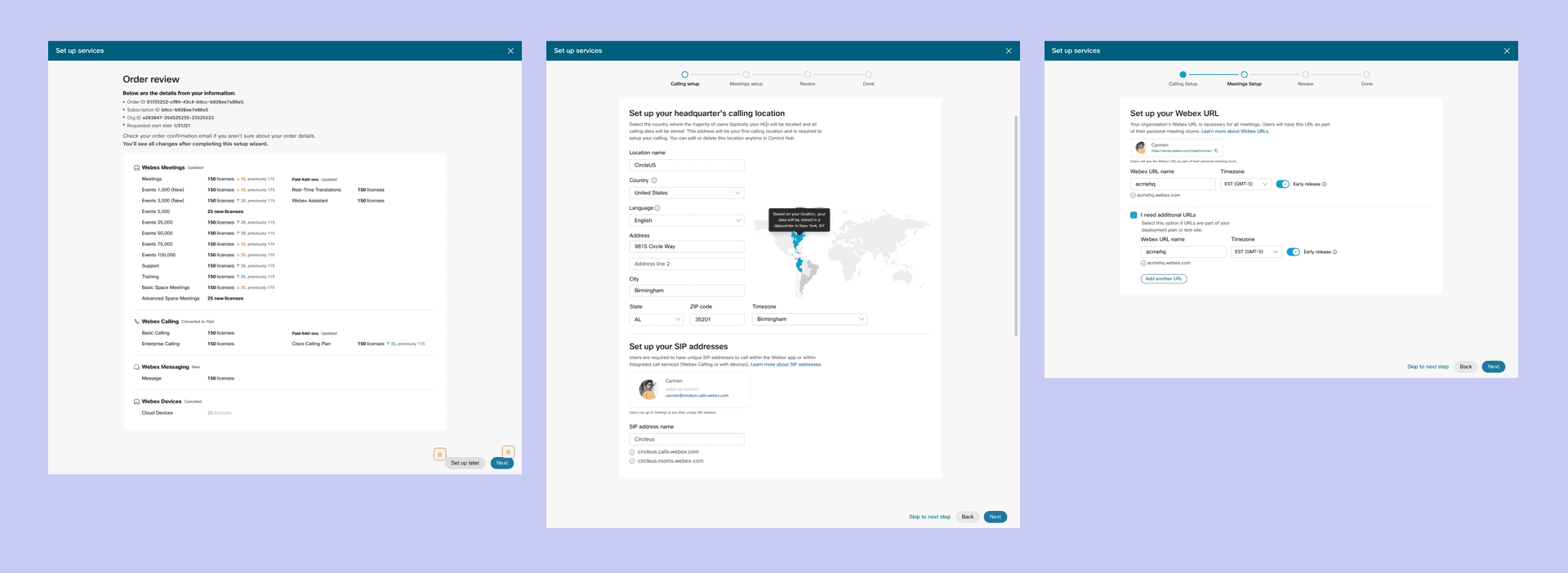
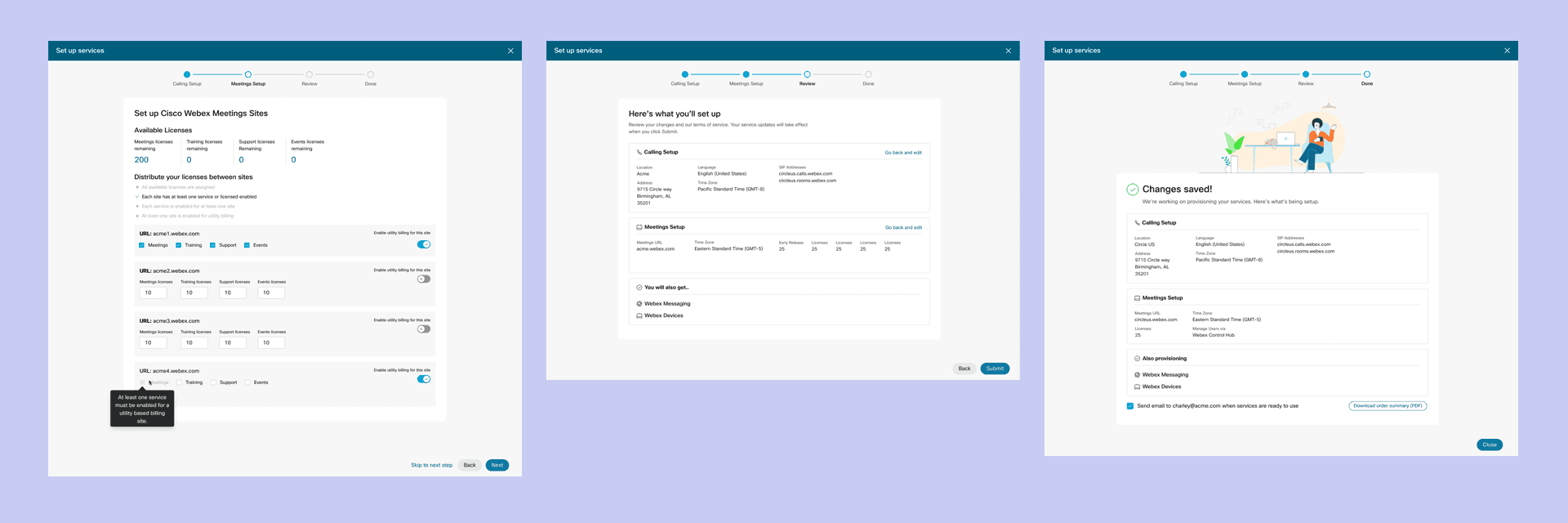
The existing paid conversion captured only four steps — missing information needed for the service to function — then redirected users to Control Hub to finish. We rebuilt it to complete the entire setup in one session.
The existing paid conversion captured only four steps — missing information needed for the service to function — then redirected users to Control Hub to finish. We rebuilt it to complete the entire setup in one session.
The existing paid conversion captured only four steps — missing information needed for the service to function — then redirected users to Control Hub to finish. We rebuilt it to complete the entire setup in one session.
New features added to the paid flow:
New features added to the paid flow:
New features added to the paid flow:
01 - Location capture and HQ Assignment
02 - License distribution per service (Calling and Meetings)
03 - Per-URL feature activation (Meetings, Training, Events, Support)
04 - Full change summary before order confirmation
01 - Select asset type (Logo / Certificate / Badge)
02 - Choose credential / Portfolio from filtered list
03 - Configure color, size, and orientation
04 - Preview live in Download Summary panel
05 - Download ZIP — all formats included
01 - Location capture and HQ Assignment
02 - License distribution per service (Calling and Meetings)
03 - Per-URL feature activation (Meetings, Training, Events, Support)
04 - Full change summary before order confirmation
Conditional scenarios
Conditional scenarios
Working with Engineering, we mapped every possible account state. Each partner type sees only the steps relevant to their setup — no unnecessary friction.
Working with Engineering, we mapped every possible account state. Each partner type sees only the steps relevant to their setup — no unnecessary friction.
New Account
New Account
No existing SIP or HQ. Assign HQ location from scratch, complete full setup flow.
No existing SIP or HQ. Assign HQ location from scratch, complete full setup flow.
Existing HQ
Existing HQ
HQ already assigned. Skip HQ location step — go directly to services configuration.
↳ Skips: HQ assignment step
HQ already assigned. Skip HQ location step — go directly to services configuration.
↳ Skips: HQ assignment step
Existing SIP
Existing SIP
SIP address already in system. Skip SIP setup — proceed to remaining configuration.
↳ Skips: SIP address step
SIP address already in system. Skip SIP setup — proceed to remaining configuration.
↳ Skips: SIP address step
The conditional logic was the most technically complex part of the project — required deep collaboration with Engineering and weekly PM sessions to map every edge case before design began.
· Intent-first guided experience with dramatically reduced cognitive load
· Single ZIP download replaces manual multi-format export
· Persistent Download Summary panel gives users real-time confidence throughout
· Highly positive stakeholder feedback from Cisco partner program team
· Scalable logic built to support future partner program and credential expansions
OUTCOME
OUTCOME
Tested extensively with users before, during, and after finalization. Positive feedback from long-time partner users — particularly on the clarity of the new flow and the reduction in Control Hub redirects.
Tested extensively with users before, during, and after finalization. Positive feedback from long-time partner users — particularly on the clarity of the new flow and the reduction in Control Hub redirects.
· Trial creation, setup, and paid conversion completed in one continuous session
· 4-step trial flow — Calling, Number, Meetings, Review — replaces fragmented original
· Conditional flows built with Engineering — each partner sees only relevant steps
· Plain-language instructions written with content writer — addressed top user interview pain point
· Positive feedback from long-time partner users in post-launch testing
· Next: update visual design with Momentum Design System integration
· Intent-first guided experience with dramatically reduced cognitive load
· Single ZIP download replaces manual multi-format export
· Persistent Download Summary panel gives users real-time confidence throughout
· Highly positive stakeholder feedback from Cisco partner program team
· Scalable logic built to support future partner program and credential expansions